

The operations hub for K–12 child nutrition.
When your team must document which students were served for reimbursement, program reporting, or district accountability, SchoolMealPass replaces paper rosters, disconnected spreadsheets, and after-the-fact cleanup with one modern workflow.
Track breakfast, lunch, snacks, supper, BIC, summer feeding, and other meal services by program, site, date, roster, and student — then report a single meal service or roll activity up across the district. Every service is tied to its reimbursement program: NSLP, SFSP, SSO, or CACFP.
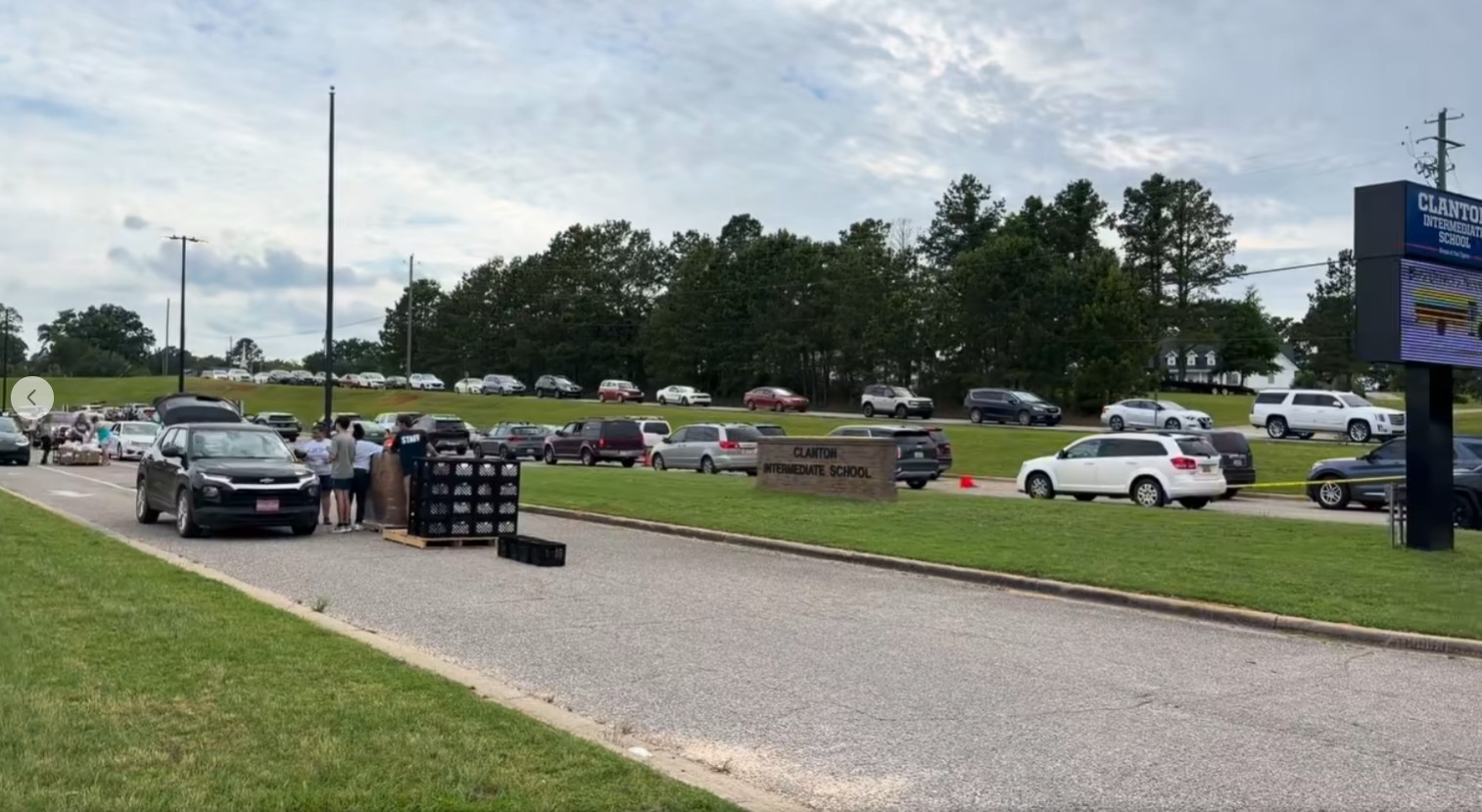 Watch on Facebook
Chilton doubled the next offering to 2,000 tickets — running high-demand registration, family reminders, pickup details, and reporting through TicketHarmony.
One student-level workflow for breakfast, lunch, snacks, supper — and BIC too.
Configure service by program, meal type, school or site, roster, schedule, and approved dates while giving each staff role a focused workflow. Each meal service is set up against its reimbursement program — the National School Lunch Program (NSLP), the School Breakfast Program (SBP), the Summer Food Service Program (SFSP), the Seamless Summer Option (SSO), or the Child and Adult Care Food Program (CACFP) — so what you claim matches how you served.
Roster-driven service
Organize students by classroom, section, homeroom, or site so staff work from the group they are actually serving.
Separate meal services
Track breakfast, lunch, snack periods, supper, and other services independently instead of blending everything into one count.
Program + date controls
Pick the reimbursement program — NSLP, SFSP, SSO, or CACFP — then set approved dates, sites, schedules, and your district’s operating rules.
SIS roster refresh
Bring roster data in from PowerSchool or another SIS using CSV-based imports and scheduled workflows.
QR + roster check-in
Support student QR badges and fast roster-based workflows from modern phones, tablets, and computers.
Report one or all
Review a single breakfast, lunch, snack, or supper service — or roll activity up across meal types, schools, programs, and dates.
One starting point your whole team can learn in a morning
Ticketing, meal service, dedup, rosters, badges, the scan station, analytics, and document extraction all open from one screen — so managers, teachers, and viewers land exactly where their work is instead of hunting through menus.
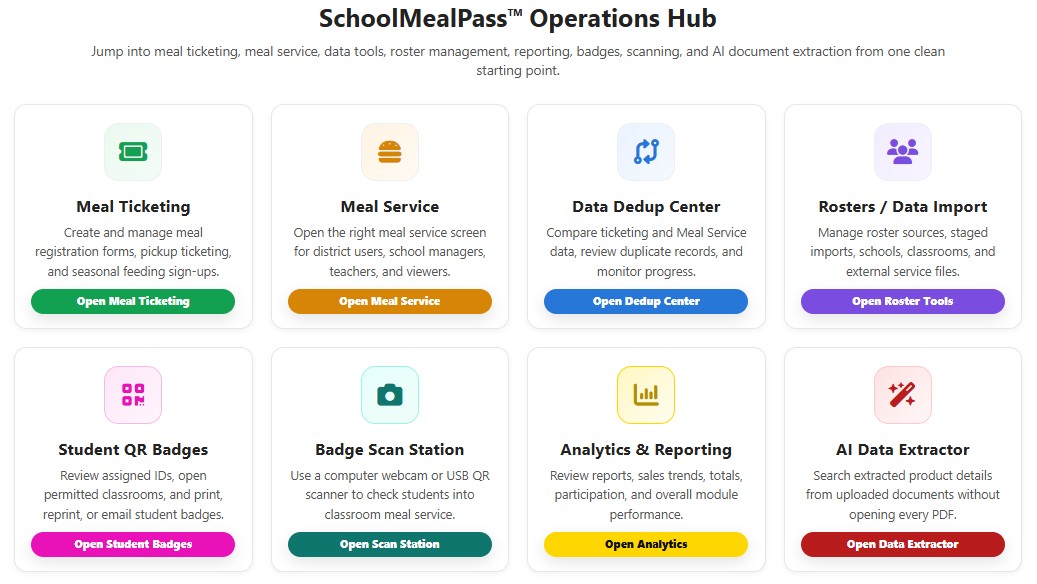 View larger
Use the same platform anywhere student-level meal accountability matters.
Keep meal services separate operationally, report on each one independently, or combine the data into broader district views — one adaptable child-nutrition operations layer instead of a different spreadsheet for every meal service.
School-year breakfast & lunch
National School Lunch Program (NSLP) and School Breakfast Program (SBP) participation with separate service periods, rosters, dates, and reporting.
Breakfast in the Classroom
A cleaner roster workflow when breakfast is served outside the cafeteria — no paper counts, no end-of-day reconciliation.
Snacks & supper — CACFP
Afterschool snack, supper, and Child and Adult Care Food Program (CACFP) service periods tracked separately with the same student-level accountability.
Summer feeding — SFSP & SSO
Summer Food Service Program (SFSP) and Seamless Summer Option (SSO) operations — congregate and approved non-congregate — with registration, service rules, locations, household workflows, and de-duplication.
Meal-by-meal or combined
Review one service on its own — or roll multiple meal services into school, program, date-range, and district views.
Multi-site & special service
Schools, pickup sites, guest meals, holidays, and special events — without a separate tracking system for each one.
See the whole meal-service operation live
Instead of waiting until after service to clean up spreadsheets or chase down numbers, staff can see what is happening across the district while programs are open and families are being served.
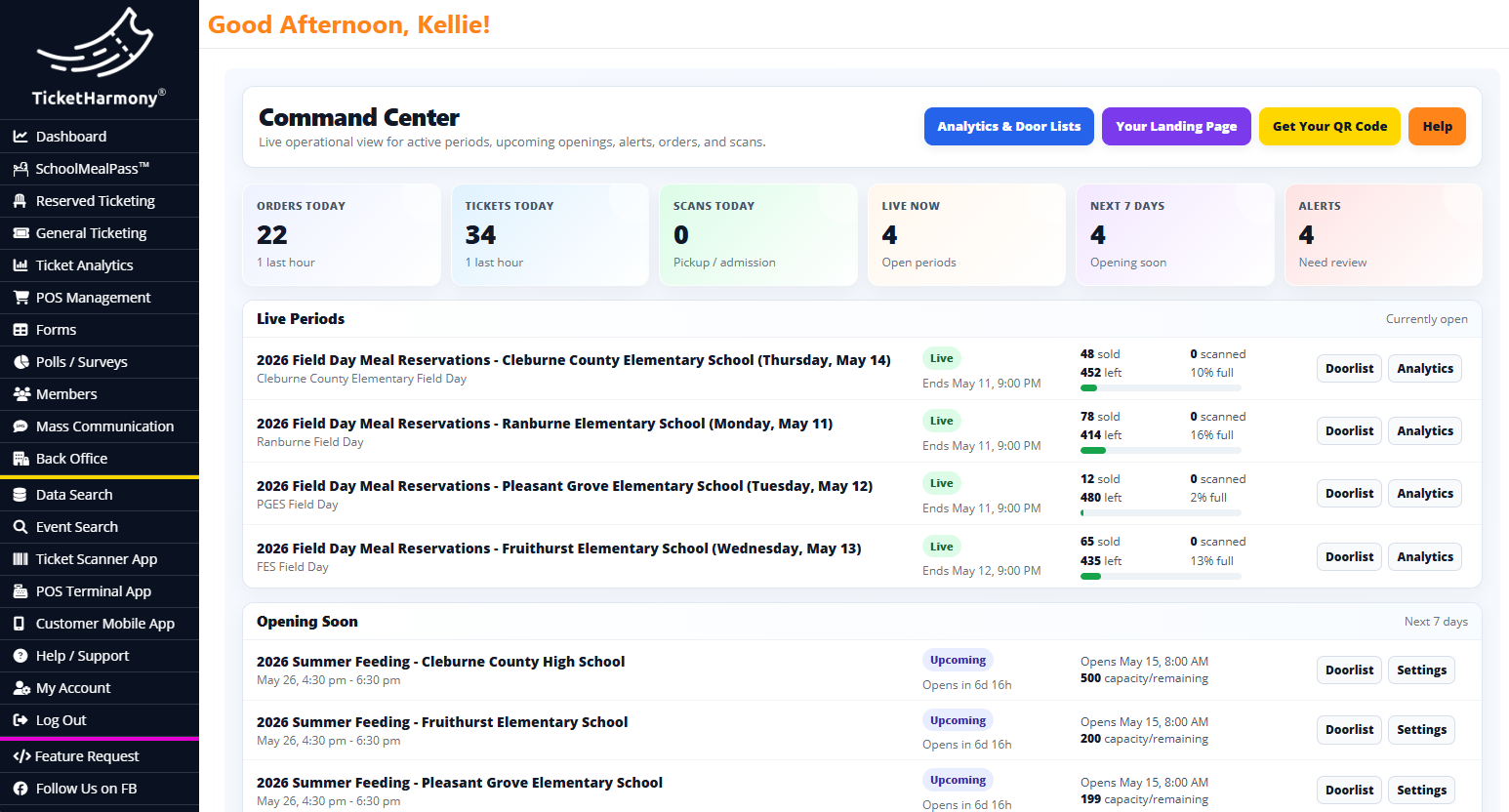 View larger
Set your program
Set your rules, locations, approved dates, and service windows.
Issue + notify
Send passes or registration links to families, then remind them on service day.
Serve & export
Scan at service and export clean, audit-ready data.
Data Extractor + School Nutritional Database
Our AI-assisted Data Extractor turns manufacturer and vendor product documents into structured food records, building a searchable, reusable nutritional database instead of leaving critical information scattered across PDFs, inboxes, and spreadsheets.
“What are you doing to check for duplicates?”
It is one of the first questions federal and state reviewers ask — and duplicate detection has become a stated priority across child nutrition program oversight. Answering it with a spreadsheet and a staff member’s memory is no longer a comfortable position. The Data Dedup Center gives your team a documented, repeatable review before counts are final.
Eligibility rules are getting more specific, and they cross programs. A student served at school under NSLP during the week may not be eligible for a curbside SFSP or SSO pickup that same week. A household may register twice under two spellings, two phone numbers, or two devices. Those overlaps are hard to see across separate forms and sites — and they are exactly what a reviewer will look for.
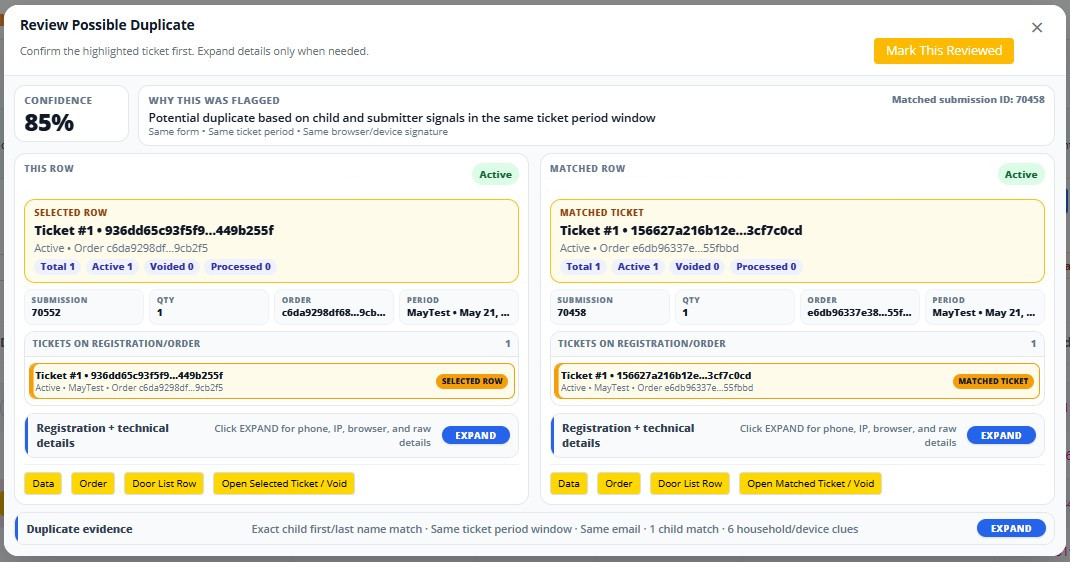 View larger
Keep families informed without creating another staff workflow.
Email and text reminders put the right information — including direct order links — back in front of families when they need it, so staff spend less time searching records, resending confirmations, and answering avoidable questions.
Put each order link back in front of the family
Reach the phone already in a parent’s hand
Run the entire cafeteria on one system with HarmonyFlo.
SchoolMealPass is purpose-built for student-level meal tracking. If your operation also needs the system behind the serving line, HarmonyFlo brings the register, kitchen, stockroom, receiving dock, time clock, and service window together around one shared catalog and one set of numbers. Most operators replace four systems with this one.
HarmonyFlo is a separate product and license from SchoolMealPass. Use either platform on its own, or talk with us about the right fit.
Straight answers before you ever get a proposal
Which meal programs does SchoolMealPass support?
Every service is configured against its reimbursement program — NSLP, SFSP, SSO, or CACFP — covering breakfast, lunch, snacks, supper, Breakfast in the Classroom (BIC), and summer feeding. All supported meal programs are included — no per-meal, per-school, or per-program fees.
Can we start in the middle of the school year?
Yes. Most districts begin with one school, meal service, or program and expand. We help you pick a clean transition point instead of waiting a year.
Does SchoolMealPass connect to our student information system?
Roster data comes in from PowerSchool or another SIS through CSV-based imports and scheduled workflows, so classroom and site groupings stay current.
What happens to our data between summer seasons?
It stays available year-round. Students, orders, users, settings, and history are waiting when the next season opens — no starting over.
Is SchoolMealPass a cafeteria point of sale system?
No — SchoolMealPass is built for student-level tracking and reporting. If you need the register, kitchen, inventory, and time clock, that is HarmonyFlo.
How does SchoolMealPass help with duplicate checking for federal and state reviews?
The Data Dedup Center flags each possible duplicate with a confidence score, the reasons behind it, and both registrations side by side. Staff confirm the call and document it through normal ticket actions — it supports review, it does not decide eligibility.
What does SchoolMealPass cost in 2027?
Effective August 2026: $4,000 Summer, $6,000 Summer High-Volume, $8,000 Year-Round, $10,000 Year-Round High-Volume. All supported meal programs are included — no per-meal, per-school, or per-program fees. Year-Round licenses also include Mass Mail ($500 value) and the School Nutritional Database ($1,000 value).
How do you decide if a district is high-volume?
Together — based on your use cases, summer feeding ticket volume, meals served across summer and school-year programs, and enrollment. We can also align the term to your fiscal-year dates.
2027 license ratesEffective August 2026
All supported meal programs included — no per-meal, per-school, or per-program fees.
Included with Year-Round licenses.
Included with Year-Round licenses.
Included in every license
One platform for every program you run — no contracts, no red tape.
Ready to launch SchoolMealPass™
Tell us what you serve, how you operate today, and where the manual work is happening. We will build a proposal around that scope.